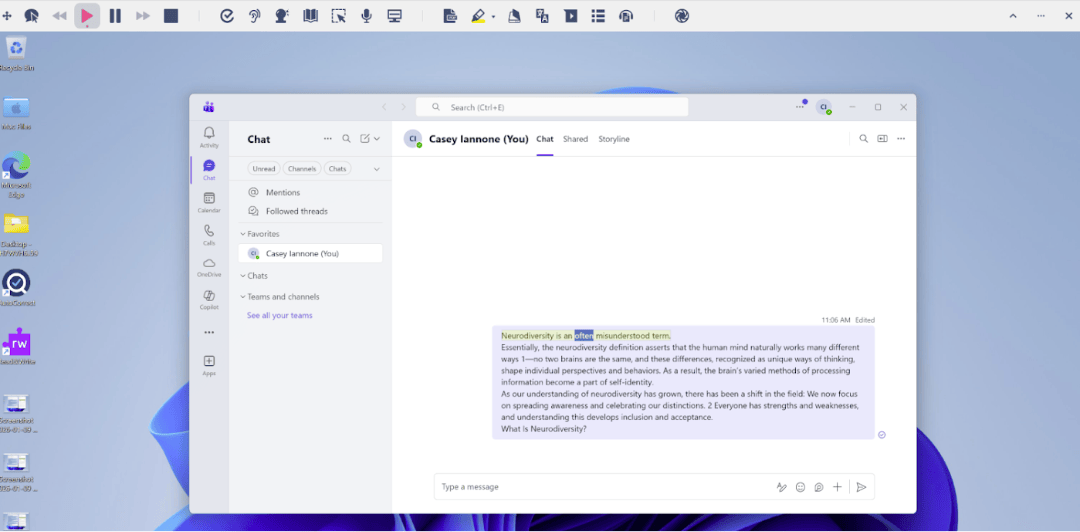
Work happens across many tools, from chats and emails to documents and fast-moving conversations. To better support how people actually work, we’ve made several updates to Read&Write for Work, bringing reading and speech support directly into Microsoft Teams and Outlook.
These updates make it easier for employees to read, review, and process information without switching context - helping support focus, understanding, and productivity throughout the working day.
What’s new
Microsoft Teams support
Read&Write now supports continuous reading with dual-color highlighting directly in the Microsoft Teams desktop app. Text can be read aloud from your cursor in:
- One-to-one chats
- Channel posts
- Copilot conversations
This means employees can follow long or fast-moving conversations more easily, with visual highlighting that supports attention and comprehension.
Outlook reading support
Read&Write now works in Outlook email drafts and preview panes. Users can select text in an email and have it read aloud with highlighting - making it easier to review messages, catch errors, or process information before responding.
In earlier versions of Read&Write, Outlook reading wasn’t available. This update now brings reading support directly into everyday email workflows.
Hover Speech, now easier to access
The feature previously known as Read the web is now available as a Hover Speech toggle on the main toolbar. This makes it quicker to turn on speech support without opening settings or interrupting your flow.
Refinements that improve everyday use
Alongside these major additions, we’ve made several smaller improvements to make Read&Write more consistent and reliable at work:
- The Dictation icon has been updated to match other Read&Write platforms
- Autocorrect filtering has been improved to reduce the chance of inappropriate word suggestions
These changes help ensure a smoother, more predictable experience across tools and platforms.
Designed for real work environments
This update reflects how people actually work today - reading across chats, emails, and collaborative spaces, often under time pressure.
By bringing continuous reading and speech support directly into Teams and Outlook,
Read&Write helps employees:
- Stay focused in busy communication channels
- Review written information more confidently
- Access support without leaving the tools they already use
It’s another step toward making our work environments more accessible, supportive, and neuroinclusive when it comes to different ways of thinking, working and processing information.